Overview
Whenever we implement Primavera Unifier, we need to integrate with other ERP or document management applications. Even though each integration requirement can be unique, we can generally categorize them into these three patterns:
- Remote Process Invocation - Request and Reply
- Remote Process Invocation - Fire and Forget
- Scheduled Polling / Batch Synchronization
Remote Process Invocation - Request and Reply
This pattern is used when one application needs an immediate answer from another application. The caller sends a request, waits for the remote system to process it, and receives a response such as success, validation failure, or technical error. It is a good fit for operations where the next step depends on the outcome of the current call.
In Primavera Unifier integrations, this pattern commonly appears when middleware calls a web service to create or update a business process record and expects an immediate HTTP/SOAP response. The caller can then decide whether to continue, retry, or log an error based on the returned status.
Generic example: A middleware service sends a “create project record” request to Unifier and waits for the response. If the record is accepted, it marks the transaction as processed. If Unifier returns an error, it records the failure and triggers support handling.
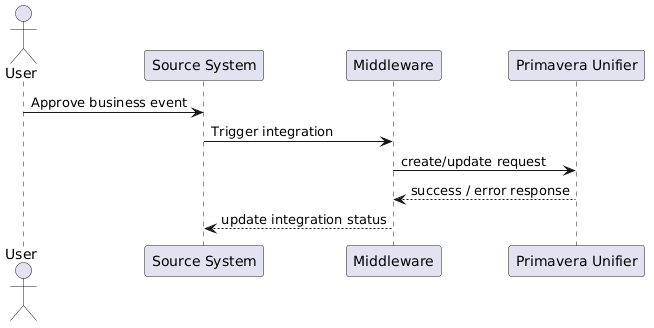 Diagram: Remote Process Invocation - Request and Reply
Remote Process Invocation - Fire and Forget
This pattern is used when the sender submits work to another system but does not wait for the full business process to finish in the same interaction. The sender may receive only a technical acknowledgement, while actual processing continues asynchronously.
This is useful for high-volume or batch-oriented integrations where immediate completion is not necessary. It reduces coupling between systems and allows the receiving side to process requests later through schedulers, queues, staging tables, or background jobs.
Generic example: Unifier writes approved records into a staging area and submits a processing request to ERP. ERP processes those records later in a batch job. If some fail, they are reported separately through error tables, notifications, or reconciliation logs.
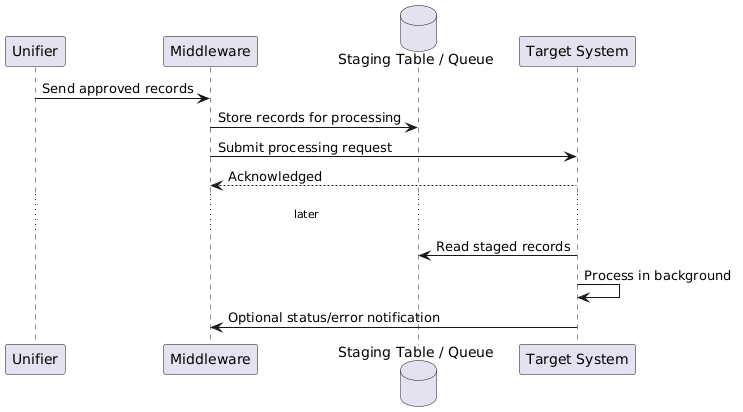 Diagram: Remote Process Invocation - Fire and Forget
Scheduled Polling / Batch Synchronization
This pattern is used when integrations are executed on a schedule rather than in real time. A scheduler or middleware component periodically checks for records that changed since the last successful run and processes them in batches.
This pattern is practical when source systems do not emit reliable real-time events, when record volumes are moderate to high, or when business tolerance allows a slight delay. It also works well with staging tables, reprocessing rules, retry logic, and last-run timestamps.
Generic example: Every 30 minutes, middleware calls a Unifier report to retrieve records changed since the last integration timestamp, inserts them into ERP staging tables, runs a processing program, and then updates the polling log with the latest processed timestamp.
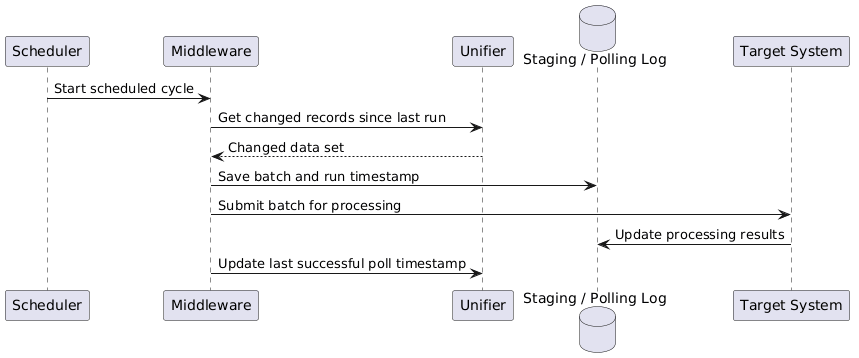 Diagram: Scheduled Polling / Batch Synchronization
When to use which pattern
- Use request-reply when downstream decisions depend on immediate validation or acceptance feedback.
- Use fire-and-forget when throughput is more important than synchronous completion.
- Use scheduled polling when near-real-time is not required and controlled batch processing is preferred.